Payment by card
The bot sends an invoice to be paid by bank card through a payment provider. The person types the card into Telegram's window. The money goes to the provider's account and from there to you.
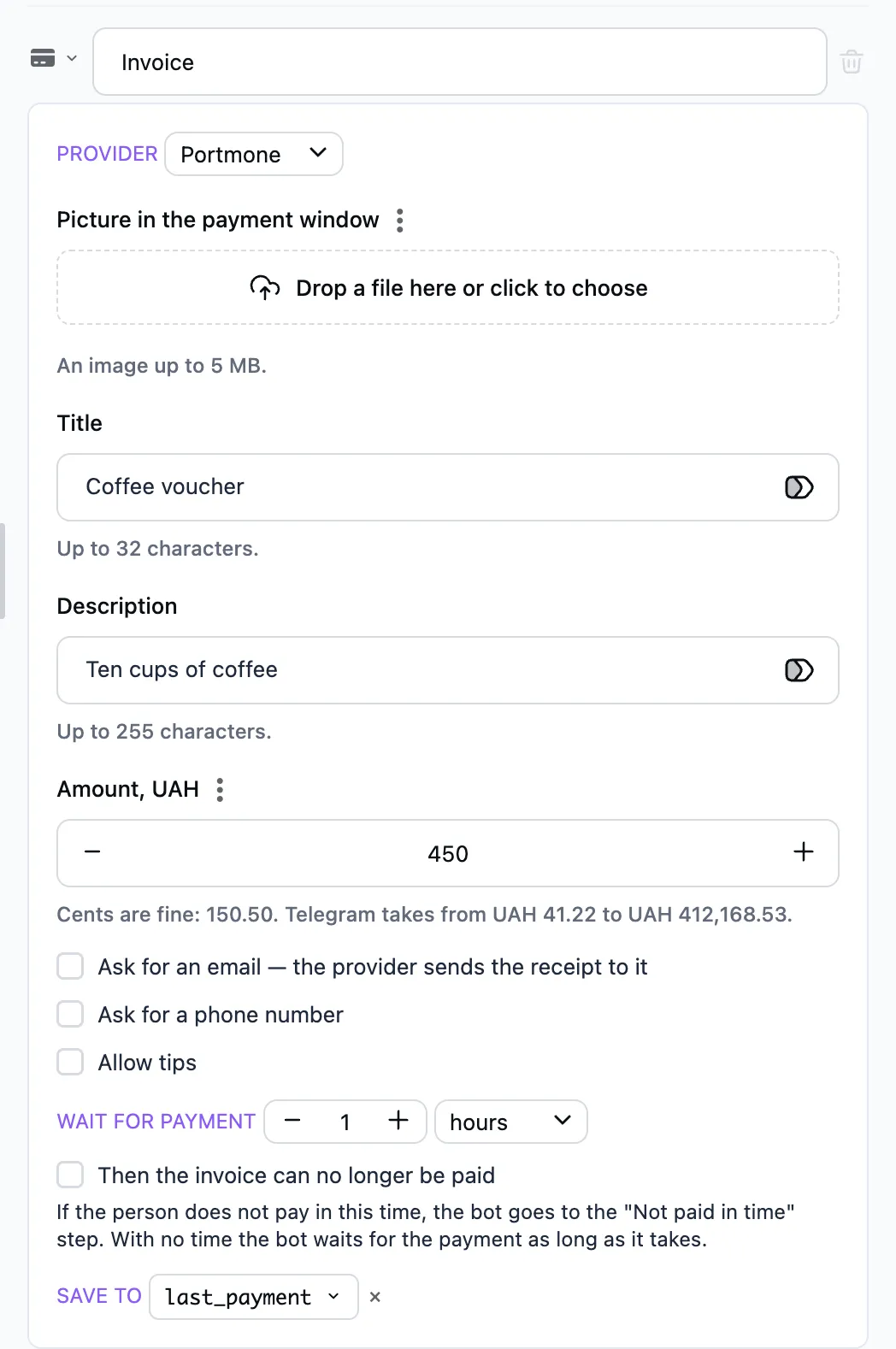
How to set it up
- Connect a payment provider in @BotFather → Payments. Pick one from BotFather's list, Portmone for example. To try it without real money, take the provider's test token. BotFather gives you the token.
- Add the provider in "Bot settings" → "Payment providers": a name, the token and the currencies it takes. The first currency is the main one. Once saved, the token is never shown. The bot tries it with a trial invoice in the main currency, and the provider is marked "checked", "token refused" or "could not check".
- In the step pick the Provider. If it takes several currencies, pick the currency too. Otherwise the invoice is in the main one.
- Type the Amount in the currency, cents are fine: 150.50. Under the field you see the range Telegram takes an invoice in that currency for.
- The Title, the Description and the Picture in the payment window work as in payment in stars.
- Add a "Paid" step. The bot goes to it when the person pays.
A test token is marked "test" in the list of providers, and the step's form warns about it: a payment goes through, but no money is charged. Without a provider the bot sends no invoice.
"Ask for an email" — Telegram asks the person for an address and passes it to the provider, which sends the receipt there. "Ask for a phone number" works the same way.
"Allow tips" adds a tip row to the payment window: the largest tip and up to four suggested amounts on buttons. A tip comes in the same payment.
Telegram allows digital goods and services to be sold for stars only. What you sell and which payment to pick is your call.
If it is not paid in time
In the "Wait for payment" field set a time, 2 hours for example, and add a "Not paid in time" step. If the person does not pay in this time, the bot goes to it. There you can remind them of the payment or offer something else. If the person has paid, the step does not run.
"Then the invoice can no longer be paid" — once the time is up, Telegram does not let the invoice be paid. The person sees that it is no longer valid.
After the payment
The bot saves the payment into the variable in the "Save to" field, last_payment by default. The variable belongs to the person and outlives the conversation:
-
user.last_payment.amount— the amount with the tip, as in the step: 150.5, not cents; -
user.last_payment.tip— the tip, when the person added one; -
user.last_payment.currency— the currency; -
user.last_payment.email,user.last_payment.phone_number— when asked for; -
user.last_payment.paid_at— when it was paid; -
user.last_payment.charge_id— the payment's number in Telegram.
These values go into a message as tokens. To hear of a payment at once, put a Notify step with the amount and email tokens in the "Paid" branch.
For the payment to open a closed channel, put the Grant channel access step in the "Paid" branch.
A card payment is refunded in the provider's dashboard. The "Refund" button on the "Payments" tab shows the payment's number to find it there by and marks the payment refunded.