Steps
Adding a step
- The first step of a new flow: press "Choose first step type".
- The next step: press "+ Step" under the last one.
- A step in between: hover between two steps and press "Insert a step before this one".
- A step after a button: under a message, press "Add button". Every button has its own chain of steps, which the person enters by pressing it.
- Branches of steps such as "Condition" or "Ask a question" have buttons of their own: "+ Yes step", "+ No step", "+ Timeout step".
Each of these opens the list of step types. The search field at the top finds a type by name. The tabs above the list show the steps of one category, and this page groups them the same way below. On the "All" tab related steps fold into one row with a count: "Ask", "Payment", "Channel access". Press such a row to pick the step. In a search or on a single tab every step has a row of its own.
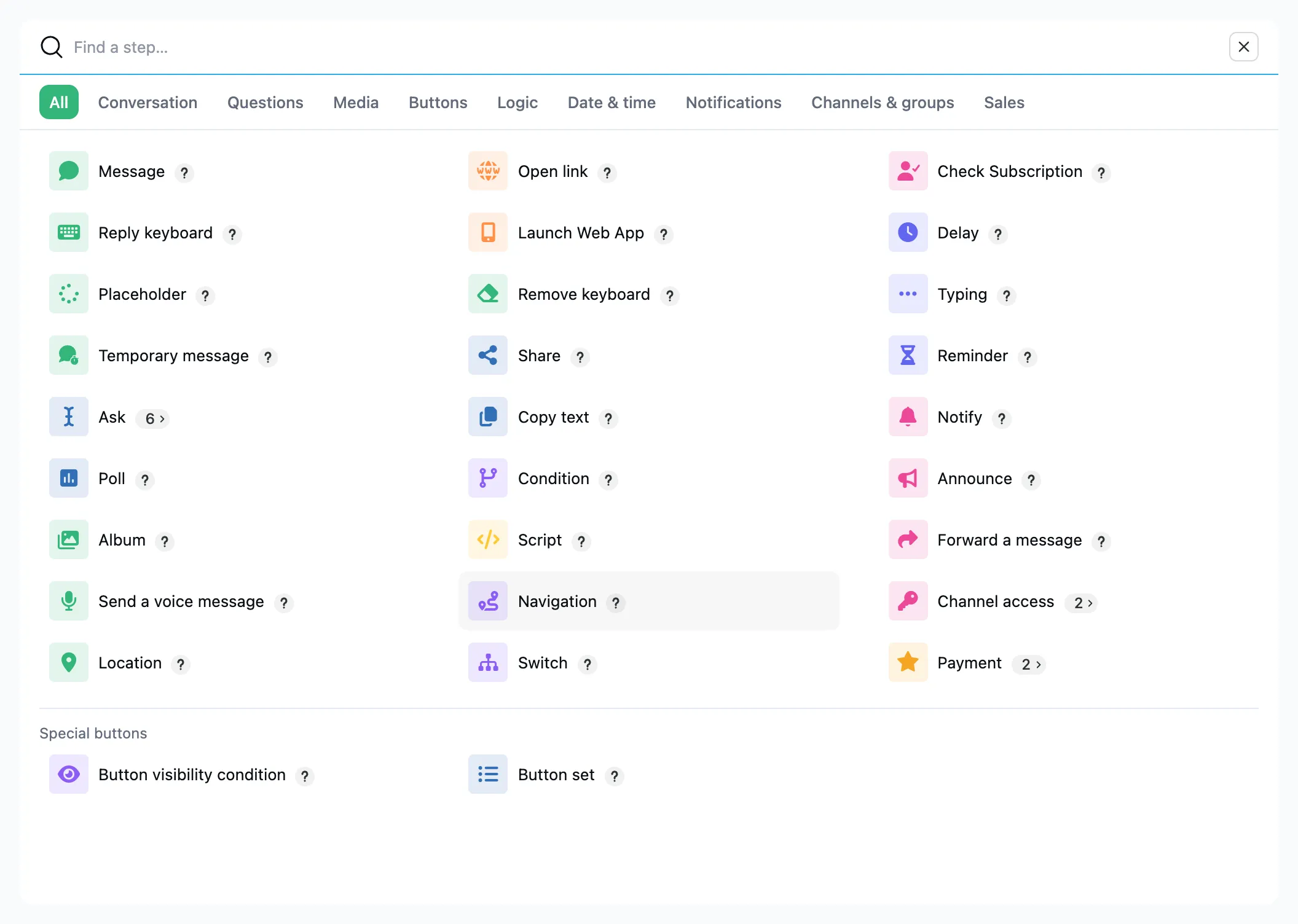
Conversation
- Message: text, a picture or video, buttons.
- Reply keyboard: a menu under the input field.
- Placeholder: a "working on it…" message the next one replaces in place.
- Temporary message: a message, album or voice message that leaves the chat after a set time.
Questions
- Ask a question, ask for a phone number, a location, a file, a voice message or a date: a question whose answer is saved to a variable.
- Poll: a poll or a quiz.
Media
- Album: several photos in one message.
- Voice message: audio as a voice message.
- Location: a place on the map with a title and an address.
Buttons
- Open link: a button with a link.
- Button set: a row of buttons from a list: products, doctors, dates.
- Button visibility condition: a button only those who meet a condition see.
- Launch Web App: a Mini App inside Telegram.
- Remove keyboard: fold away the reply keyboard.
- Share: a button that shares a link.
- Copy text: a button that copies a text.
Logic
- Condition: the "Yes" and "No" branches.
- Script: calculate or change variables, call another service.
- Navigation: start over, go back, move to another flow.
- Switch: a path of its own for each value of a variable.
- Check Subscription: whether the person is in your channel.
Date & time
- Delay: a pause before the next step.
- Typing: "typing…" before the next step.
- Reminder: a message later, at a set time.
- Pick a date: a calendar the person picks a day from.
Notifications
- Notify: a message to you or to a channel.
- Announce: news for a chosen audience.
- Forward a message: the person's message as it is — to an audience, channels or a chat.
Channels & groups
- Grant channel access: lets the person into a closed channel or group, for a term or for good.
- Revoke channel access: removes the person from a closed channel or group and takes their access back.
Sales
- Payment in stars: an invoice paid in Telegram Stars.
- Payment by card: an invoice paid by card through a payment provider.
Special buttons
Some types change the button itself rather than coming after it. They show up only when you add a step under a button.
- "Button visibility condition" and "Button set" sit in a group of their own, "Special buttons".
- "Open link", "Share" and "Copy text" are offered only for buttons under a message.