How to sell access to a private Telegram channel through a bot
The «Закритий клуб» (Private club) template turns the bot into a Telegram bot for paid access to a channel or group: a person pays an invoice, the bot lets them into the channel for the paid period, reminds them to renew before it ends, and removes them from the channel afterwards. The template works with the "Grant channel access" step.
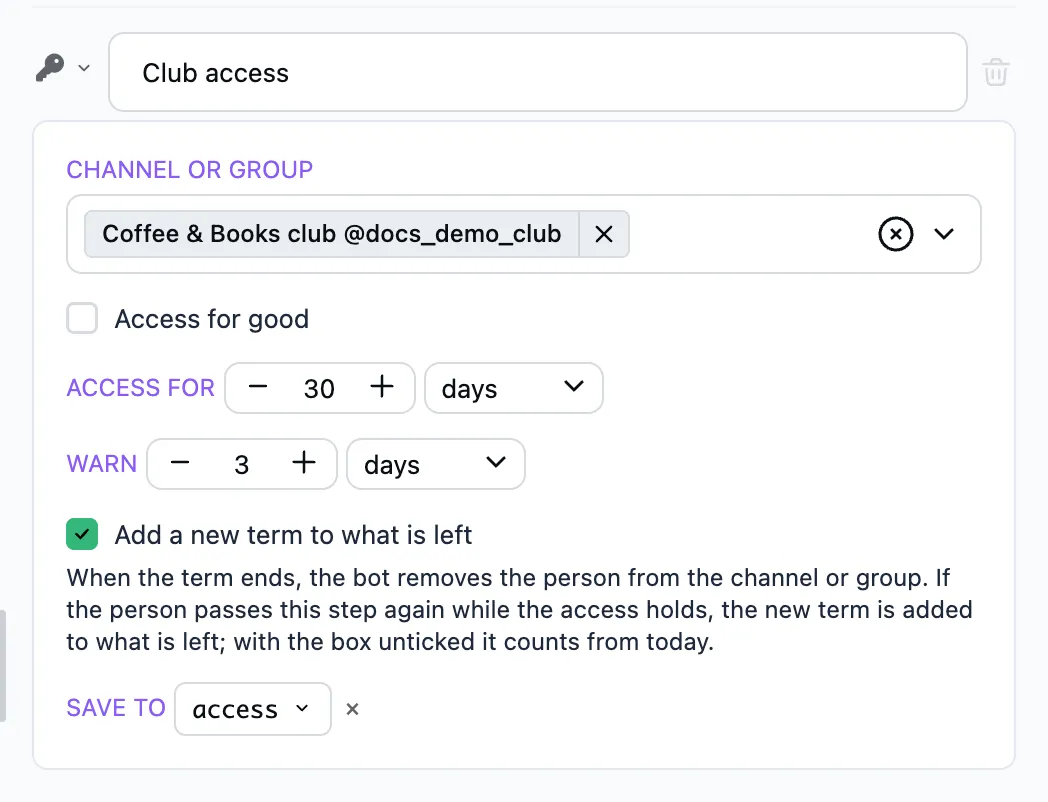
The template's texts are in Ukrainian. You can change them in the wizard and in the editor.
What the member goes through
- The person sends
/start. The bot greets them and shows the "Приєднатись" (Join) button. - The bot sends the invoice «Доступ до клубу» (Club access). The person pays in Telegram's window. If they do not pay within an hour, the bot says the time to pay is over, and the invoice can no longer be paid. A new invoice comes with
/start. - After the payment the bot opens the access for 30 days and sends the "Перейти до каналу" (Go to the channel) button. The person follows the link and sends a join request. The bot approves it at once.
- Three days before the end of the term, the bot reminds them to renew with a "Продовжити" (Renew) button. The new term is added to what is left.
- When the term is over, the bot removes the person from the channel and says they can come back any time. The "Повернутись" (Come back) button leads to a new invoice.
The term, the warning and the texts are set in the wizard.
What to prepare
- A private channel or group. Add the bot to it as an administrator with the rights to invite and ban members. The channel shows up in "Bot settings" → "Channels".
- For payment by card, a payment provider in the bot's settings.
What the template installs
Two flows: «Закритий клуб» (/start) and «Оплата і доступ».
What the wizard asks
- Access — the channel or group, the access term and how long before its end to warn. This is the form of the Grant channel access step.
- Invitation — the text of the first message and the caption of its button.
- Payment — in stars or by card, the title, description and amount of the invoice. This is the form of the Payment in stars or Payment by card step.
- Paid — what the bot says after the payment. The messages for the end of the term and for a failed access come with the template's own text.
The Templates page describes how to go through the wizard.
Whom the bot leaves alone
Members who are in the channel already are not removed, and no term counts for them. The channel's old invite links keep working past the bot: revoke them in the channel's settings.
FAQ
Is this a subscription with automatic charges?
No. Every renewal is a new payment. The bot reminds about the end of the term and gives a button to a new invoice.
Stars or card?
Both are offered on the wizard's "Payment" step. Telegram allows digital goods and services to be sold for stars only. Payment by card needs a payment provider in the bot's settings.
Can one access open several channels?
Yes. On the "Access" step pick several channels. They share the term. The "Go to the channel" button leads to the first one, and the links to all of them are in the user.access.invite_links variable.
What happens to people already in the channel?
Nothing. The bot counts a term only for those who got their access through it.