How to let people into a private Telegram channel through a bot
The "Grant channel access" step lets the person into a closed channel or group, for a term or for good. When the term ends, the bot removes the person from the channel. Placed in the "Paid" branch after an invoice, this step makes paid access to a Telegram channel through a bot.
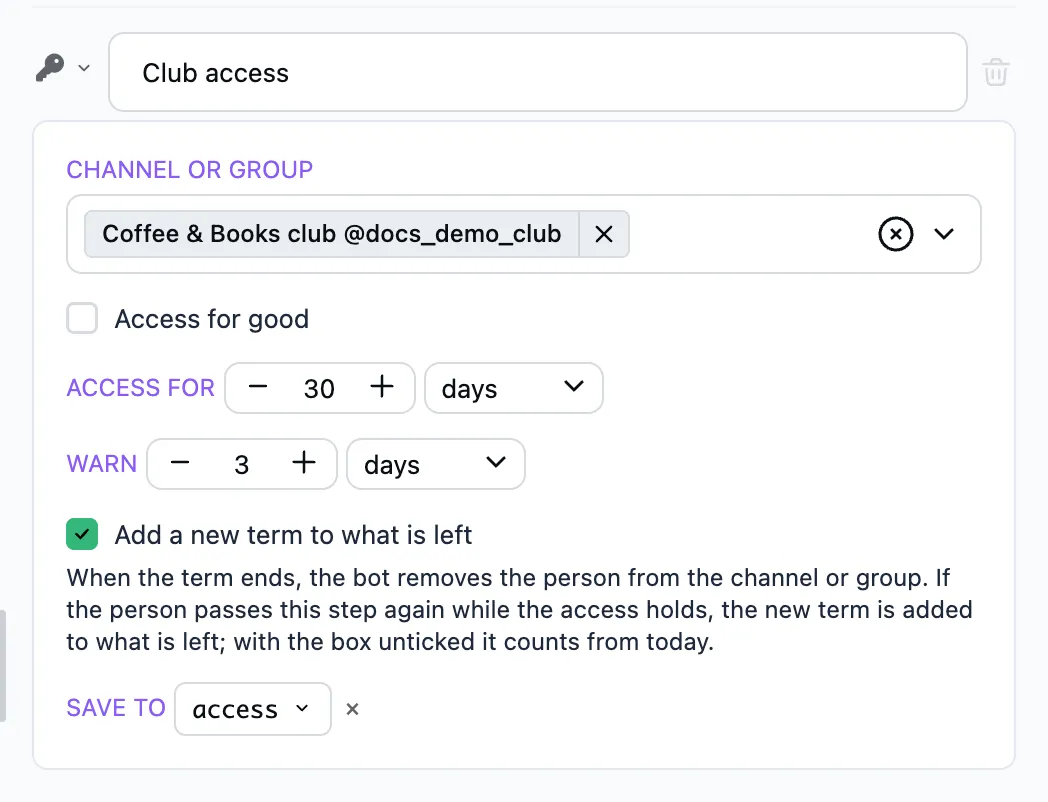
How to set it up
- Add the bot to the channel as an administrator with the rights to invite and ban members. The channel shows up in "Bot settings" → "Channels". If one of these rights is missing, the step's form warns you.
- In the "Channel or group" field pick the channel, or several. They share the access and its term.
- In "Access for" pick how long the access lasts, 30 days for example. For an access that never ends, tick "Access for good".
The step most often stands in the "Paid" branch of Payment in stars or Payment by card. The Private club template installs a ready scenario with the invoice, the access and the reminders.
Whom the step covers
The step governs only the access a person got through it. Members who were in the channel already, or came in another way, it leaves alone: no term counts for them and nobody removes them. The channel's old invite links work past the bot. If joining should go through the bot only, revoke them in the channel's settings.
The link to the channel
The step itself sends the person nothing. After it add an Open link button with the user.access.invite_link token. With several channels, the links to each are in user.access.invite_links.
How the person gets in
There is one link per channel, and it lets nobody in by itself. The person follows it and sends a join request. The bot approves the request if the person holds an access. If there is none or its term has ended, the bot declines it. A link forwarded to someone else does not help them.
The bot leaves alone the requests to channels this step is not used for.
When the term ends
- "Warn" is how long before the end of the term the bot goes to the "Access is ending" step. A good place to remind about the payment and give a button that leads to the invoice, with a Navigation step for example.
- When the term has ended, the bot removes the person from the channel and goes to the "Access has ended" step.
If the person passes the step again
While the access holds, the new term is added to what is left: 10 days left and 30 more make 40. Whoever renews early loses none of the days they paid for.
Untick "Add a new term to what is left", and the term counts from today: 30 days, whatever was left. That is for a trial or a free access, which should not pile up.
The old warning and removal do not run after a new grant. An access for good stays for good.
Once removed, the person can send a request again as soon as they get a new access.
To take the access back before the term ends, use the Revoke channel access step.
What is saved
The bot saves the access to the variable from the "Save to" field, access by default:
-
user.access.invite_linkis the link to the channel, the first of those picked; -
user.access.invite_linksis the list of all: thetitleandinvite_linkof each channel; -
user.access.expires_atis when the access ends; empty when it is for good.
If the access could not be granted
This happens when the bot is not an administrator of the channel, may not invite members, or no channel is picked in the step. Then no access opens to any of the channels, and the bot:
- sends you a message with the reason, no more than once an hour for one step;
- goes to the "Access not granted" step if you added one. If not, the bot tells the person that something went wrong.
The "Access granted" step does not run in that case.
If the bot may not ban members, the person stays in the channel after the term. You get a message about that too.
FAQ
Does the invite link itself open the channel?
No. Through the link the person sends a join request. The bot approves it only when the person holds an access to that channel.
How do I make access to the channel paid?
Put the step in the "Paid" branch of "Payment in stars" or "Payment by card", and after it send the link in a button with the user.access.invite_link token. Access to a channel is a digital service, and by Telegram's rules it is sold inside Telegram for stars.
Does the access renew by itself?
No, every renewal is a new payment. The bot reminds about the end of the term with the "Access is ending" step, where a button can lead to a new invoice. The new term is added to what is left.
What happens if the bot loses its administrator rights?
The bot can neither approve requests nor remove people after the term. People stay in the channel, and you get a message about the error.